
Download Mailboxer – Free Smart Mailbox Manager for macOS
Overview
Mailboxer is a lightweight, free macOS utility that brings a smarter way to organize your e‑mail contacts. Built for Mac OS X and its legacy versions, this Internet‑software‑category application focuses on creating “smart mailboxes” that automatically group messages based on sender, domain, or custom rules you define. Since its debut in 2007, Mailboxer has earned a modest but loyal user base, with over 379 downloads recorded to date.
The current version, 5.0, was last updated on May 9 2007, and the program is available in English, German, and French. Its small footprint makes it ideal for users who want a powerful contact‑sorting tool without sacrificing disk space or system performance. Whether you’re a busy professional juggling multiple accounts or a casual user who wants a tidy inbox, Mailboxer offers a secure, no‑cost solution that integrates seamlessly with the native Mail app.
Key Features of Mailboxer
- Dynamic Smart Mailboxes: Automatically sort incoming messages into custom folders based on sender address, domain, or keyword filters.
- Multi‑Language Support: Interface available in English, German, and French, making it accessible for a broad audience.
- Lightweight Design: Requires minimal storage and CPU resources, ensuring fast launch times even on older Mac hardware.
- Seamless Integration: Works directly with macOS Mail, preserving native look‑and‑feel while extending functionality.
- Rule‑Based Automation: Create, edit, and prioritize rules that trigger mailbox actions without manual intervention.
- Secure Operation: No external servers or cloud components; all sorting occurs locally on your Mac, protecting privacy.
- Customizable Views: Adjust column layouts, sorting order, and visual themes to match personal workflow preferences.
Beyond the core list, Mailboxer includes a simple preferences pane where users can fine‑tune synchronization intervals, set default mailbox colors, and enable notifications for high‑priority messages. The application also supports export and import of rule sets, making it easy to migrate configurations between Macs or share best‑practice templates with colleagues. While the UI may feel classic by modern standards, its reliability and straightforward approach to contact management have kept it relevant for users who value stability over flashiness.
Installation & Usage Instructions
Step‑by‑Step Installation
Getting Mailboxer up and running is a breeze. Follow these steps to ensure a smooth setup:
- Visit the official download page or a trusted Mac software repository and click the Download Mailboxer button.
- Once the
.dmgfile finishes downloading, double‑click it to open the installer disk image. - Drag the Mailboxer icon into your Applications folder. macOS may prompt you to confirm the move; click Copy to proceed.
- Navigate to Applications and double‑click Mailboxer.app. The first launch may trigger a security warning; choose Open to allow the app to run.
- When prompted, grant Mailboxer access to your Mail data via System Preferences → Security & Privacy → Privacy tab → Mail.
Basic Usage Walkthrough
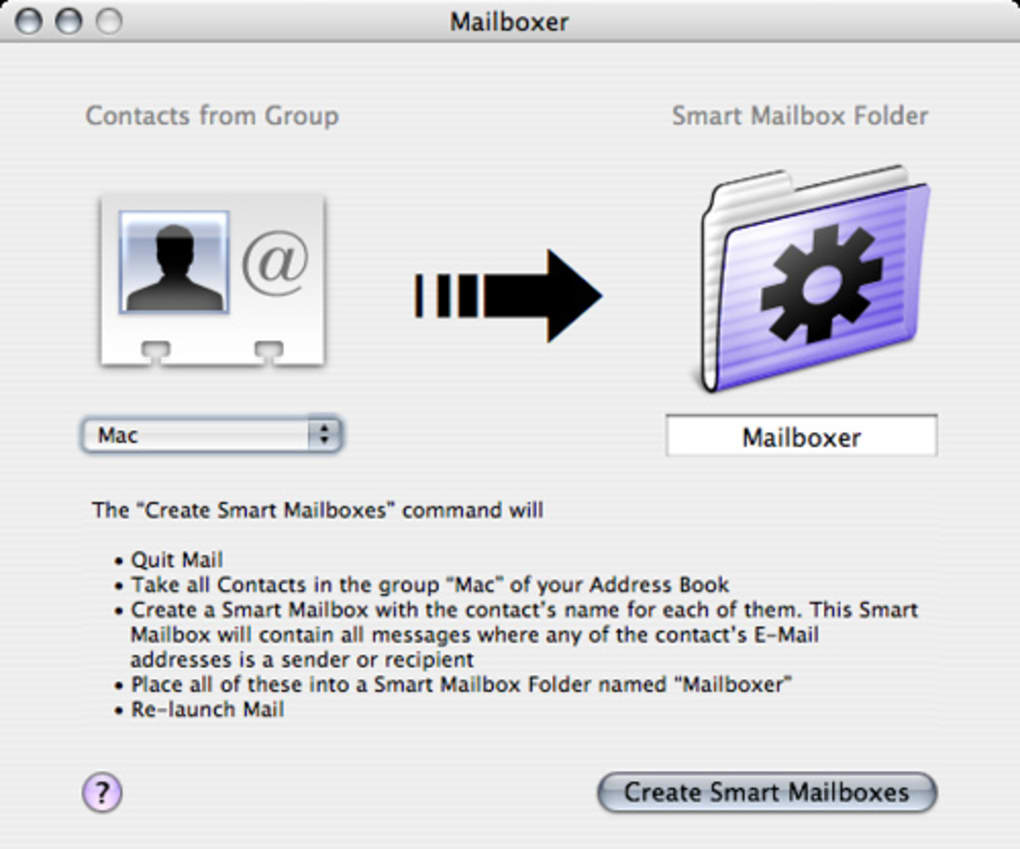
After installation, start Mailboxer from the Dock or Launchpad. The main window presents a list of existing smart mailboxes on the left and a preview pane on the right. To create a new smart mailbox, click the + button, give it a meaningful name, and define rules using the drop‑down menus (e.g., “From contains @example.com”). You can add multiple criteria and choose whether they must all match (AND) or any match (OR). Once saved, Mailboxer instantly begins populating the mailbox with matching messages, and you’ll see the count update in real time.
Advanced users can export rule sets via File → Export Rules, allowing them to back up configurations or share them across devices. To edit a smart mailbox, simply double‑click its name and adjust the conditions. The built‑in search bar lets you quickly locate specific mailboxes or filter messages within a selected mailbox. When you’re satisfied with the organization, you can hide the Mailboxer window and let the background service continue sorting incoming mail automatically.
Compatibility, Pros & Cons
Mailboxer is compatible with macOS 10.4 (Tiger) through macOS 10.7 (Lion), covering both legacy systems and more recent releases. While the software does not officially support macOS 10.8 and later, many users report stable operation on newer versions provided they disable Gatekeeper restrictions for this unsigned app. The program runs on Intel‑based Macs and, with Rosetta 2, can operate on Apple Silicon devices, though performance may vary.
Pros
- Free and No‑Ads: Completely cost‑free with no hidden advertisements.
- Low System Impact: Minimal CPU and RAM usage, ideal for older hardware.
- Local Processing: All sorting happens on the device, preserving privacy.
- Custom Rule Engine: Flexible criteria let you tailor mailboxes to any workflow.
- Multi‑Language Interface: Supports English, German, and French out of the box.
Cons
- Outdated UI: The visual design reflects early‑2000s macOS aesthetics.
- Limited macOS Support: No official updates for macOS 10.8 +; may require manual workarounds.
- No Cloud Sync: Settings are stored locally; no automatic backup across devices.
- Sparse Documentation: Official help files are brief, relying on community forums for deeper guidance.
- Last Update 2007: Lack of recent development could raise compatibility concerns for power users.
Frequently Asked Questions
Is Mailboxer still safe to use on the latest macOS versions?
Although Mailboxer was last updated in 2007, it runs on newer macOS releases when Gatekeeper is set to allow apps from unidentified developers. Because the software works locally and does not connect to external servers, the security risk is low, but you should always keep a backup of your mail data.
Can I sync Mailboxer rules across multiple Macs?
Mailboxer does not include built‑in cloud sync. However, you can manually export your rule set (File → Export Rules) and import it on another Mac, or store the exported file in a cloud folder like iCloud Drive or Dropbox for easy sharing.
Does Mailboxer work with other mail clients besides Apple Mail?
Mailboxer is designed to integrate directly with the native macOS Mail app. It does not currently support third‑party clients such as Outlook or Thunderbird, so its smart mailbox features are limited to Apple Mail.
How much disk space does Mailboxer consume?
The application package is under 5 MB, and the additional data it creates (rules and mailbox indexes) typically stays below 20 MB, making it an excellent choice for systems with limited storage.
Is there a way to automate mailbox cleanup with Mailboxer?
Mailboxer focuses on sorting rather than deletion. You can, however, combine smart mailbox criteria with macOS’s built‑in rules to move or flag messages, and then manually purge the smart mailbox when needed.
Conclusion & Call to Action
Mailboxer remains a niche yet valuable tool for macOS users who need a free, lightweight method to keep their inbox organized without relying on cloud services. Its smart mailbox engine, multilingual support, and minimal resource footprint make it especially appealing to those operating on older Mac hardware or who prioritize privacy. While the interface feels dated and the lack of recent updates may deter power users, the core functionality still delivers tangible productivity gains for everyday e‑mail management.
If you’re looking for a cost‑free way to create dynamic mailboxes that automatically categorize contacts and messages, give Mailboxer a try. Download Mailboxer now and experience a cleaner, more efficient mail workflow on your Mac.







